
Client to Client Communication
By defautlt Wag has client isolation, i.e one device cannot talk to another device within the Wag VPN network.
To change this, you'll need to define and ACL rule to allow access to the Wag network, add an entry to NATExcludeRanges in config.json and make sure your clients have your VPN range in their AllowedIps.
Example Network
VPN range: 10.112.3.0/24
Laptop: 10.112.3.2 Desktop: 10.112.3.3
Configuration
In this example I am going to be adding the ACL changes to the any (*) rule will applies to all devices. You may want to be a bit more granular.
"NATExcludeRanges": ["10.112.3.0/24"]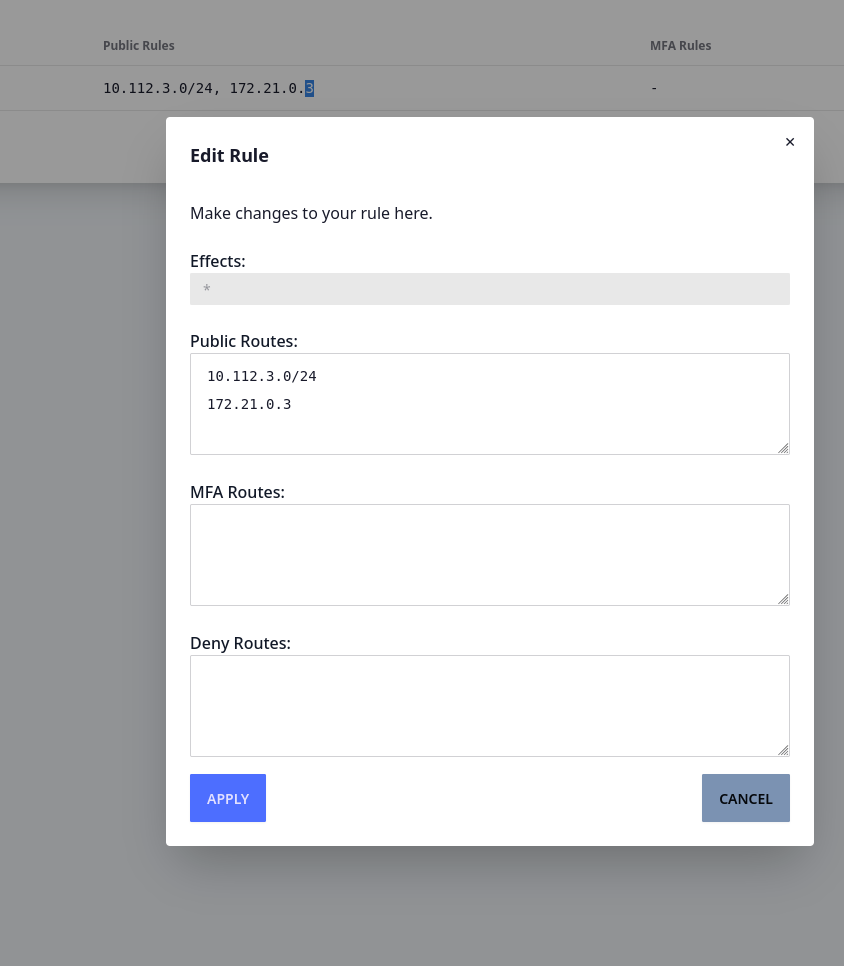
Then either redploy your devices with the registration endpoint, or modify the wireguard profiles in place to contain the vpn range
[Interface]
PrivateKey = <omitted>
Address = 10.112.3.2

[Peer]
Endpoint =  your.vpn.example.com:11371
PublicKey = 4DctukxZiIxEcJA/MqKSV8YoCYkcrsbapFpu4CLGekY=
AllowedIPs = 10.112.3.1/32, 10.112.3.0/24
PersistentKeepAlive = 10
You should now be able to ping and connect to your clients from your clients.
Gotchas
Redirect Host/New nexthop
If you get errors like the following:
64 bytes from 10.112.3.3: icmp_seq=4 ttl=63 time=119 ms
From 10.112.3.1 icmp_seq=5 Redirect Host(New nexthop: 10.112.3.3)
64 bytes from 10.112.3.3: icmp_seq=5 ttl=63 time=131 ms
From 10.112.3.1 icmp_seq=6 Redirect Host(New nexthop: 10.112.3.3)
64 bytes from 10.112.3.3: icmp_seq=6 ttl=63 time=150 ms
64 bytes from 10.112.3.3: icmp_seq=7 ttl=63 time=172 ms
This is just the host being confused why you're routing link local traffic through it. Safe to ignore, and you can disable them in the linux/windows kernel if you need to.